
Video details, video engagement counts and video creator details
Watch and share videos on Vimeo.
Your information
A Vimeo video link, for example https://vimeo.com/76979871.
Example results
The Mountain
Uploaded Apr 15, 2011
 Watch on Vimeo
Description
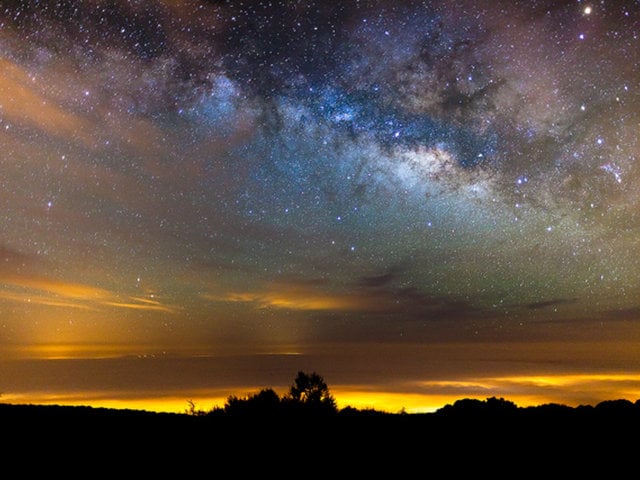
Follow on: https://facebook.com/TSOphotography for more photos, videos and updates. This was filmed between 4th and 11th April 2011. I had the pleasure of visiting El Teide. Spain´s highest mountain @(3718m) is one of the best places in the world to photograph the stars and is also the location of Teide Observatories, considered to be one of the world´s best observatories. The goal was to capture the beautiful Milky Way galaxy along with one of the most amazing mountains I know El Teide. I have to say this was one of the most exhausting trips I have done. There was a lot of hiking at high altitudes and probably less than 10 hours of sleep in total for the whole week. Having been here 10-11 times before I had a long list of must-see locations I wanted to capture for this movie, but I am still not 100% used to carrying around so much gear required for time-lapse movies. A large sandstorm hit the Sahara Desert on the 9th April (http://bit.ly/g3tsDW) and at approx 3am in the night the sandstorm hit me, making it nearly impossible to see the sky with my own eyes. Interestingly enough my camera was set for a 5 hour sequence of the milky way during this time and I was sure my whole scene was ruined. To my surprise, my camera had managed to capture the sandstorm which was backlit by Grand Canary Island making it look like golden clouds. The Milky Way was shining through the clouds, making the stars sparkle in an interesting way. So if you ever wondered how the Milky Way would look through a Sahara sandstorm, look at 00:32. Available in Digital Cinema 4k. Follow Facebook: http://www.facebook.com/TSOPhotography Follow Twitter: http://twitter.com/TSOPhotography Follow Google+: https://plus.google.com/107543460658107759808 Press/licensing/projects contact: [email protected]
Tags
- hd
- tenerife
- sky
- vimeo
- dreamscape
- visual
- dolly
- canon
- valley
- seascape
- stars
- milkyway
- astro
- star
- landscape
- nature
- spain
- mountain
- time-lapse
- timelapse
About the Vimeo tool
Vimeo (Vimeo.com) Get video returns a public video’s title, description, tags, length, upload date, thumbnail, and link; it needs a video link.
Get video also returns creator details and like, play, and comment counts, which may be null when hidden.
Built from vimeo.com. Last checked Sep 29, 2026.
Actions
Get video
1 creditGet a public Vimeo video’s title, creator, counts, length, upload date, description, tags, thumbnail, and link. Counts are null when not shown by the creator; private, deleted, and password-protected videos are unavailable.
What you provide
| Field | Type | Required | Description |
|---|---|---|---|
Videovideo | Text | Required | A Vimeo video link, for example https://vimeo.com/76979871.Example: https://vimeo.com/22439234 |
What you get
| Field | Type | Description |
|---|---|---|
Tagstags | List | Video tags. |
Titletitle | Text | Video title.Example: The Mountain |
Lengthlength | Text | Video length in minutes and seconds, or hours, minutes and seconds.Example: 3:05 |
Video IDvideo_id | Text | Vimeo video ID.Example: 22439234 |
Like Countlike_count | Number | Number of likes, or null when hidden.Example: 104323 |
Play Countplay_count | Number | Number of plays, or null when hidden.Example: 79120060 |
Video Linkvideo_link | Text | Link to the video on Vimeo.Example: https://vimeo.com/22439234 |
Descriptiondescription | Text | Video description as plain text. |
Upload Dateupload_date | Date | Date the video was uploaded (YYYY-MM-DD).Example: 2011-04-15 |
Creator Namecreator_name | Text | Name of the video creator.Example: TSO Photography |
Comment Countcomment_count | Number | Number of comments, or null when hidden.Example: 2736 |
Length (seconds)length_seconds | Number | Video length in seconds.Example: 185 |
Creator Profile Linkcreator_profile_link | Text | Link to the creator’s Vimeo profile.Example: https://vimeo.com/terjes |
Thumbnail Image Linkthumbnail_image_link | Text | Link to the video thumbnail image.Example: https://i.vimeocdn.com/video/145027281-cf3e3e047a52e2210b26bbcf42fcde909a80a7dd… |
Example result
For Video: https://vimeo.com/22439234
{
  "tags": [
    "hd",
    "tenerife",
    "sky"
  ],
  "title": "The Mountain",
  "length": "3:05",
  "video_id": "22439234",
  "like_count": 104323,
  "play_count": 79120060,
  "video_link": "https://vimeo.com/22439234",
  "description": "Follow on:\n\nhttps://facebook.com/TSOphotography for more photos, videos and updates.\n\nThis was filmed between 4th and 11th April 2011. I had the pleasure of visiting El Teide.\n\nSpain´s highest mountai…",
  "upload_date": "2011-04-15",
  "creator_name": "TSO Photography",
  "comment_count": 2736,
  "length_seconds": 185,
  "creator_profile_link": "https://vimeo.com/terjes",
  "thumbnail_image_link": "https://i.vimeocdn.com/video/145027281-cf3e3e047a52e2210b26bbcf42fcde909a80a7dd023a757b95af01936d065ec0-d_640?region=us"
}
For developers
Call it from your code with one request. Change the values in input to run it on new data. To get an API key, open Developers at the bottom of Studio, turn on Developer mode and go to API keys.
curl 'https://api.fous.com/v1/query' \
  --fail-with-body --silent --show-error --max-time 180 \
  -H "Authorization: Bearer YOUR_API_KEY" \
  -H 'Content-Type: application/json' \
  --data-raw '{
  "api": "@vimeo",
  "visibility": "public",
  "operation": "get_video",
  "version": 1,
  "input": {
    "video": "https://vimeo.com/22439234"
  },
  "response": {
    "format": "json"
  }
}'
What you can do with it
- Review public video details before adding them to a content catalog.
- Track visible likes, plays, and comments across videos.
- Organize videos by creator, upload date, or tags.
- Link video records to their Vimeo pages and thumbnails.
Questions about Vimeo
Can I run it with my own inputs?
Yes. Change the inputs in Studio and press Run, or send new inputs from your code, or ask a connected AI assistant.
Can I call this Vimeo tool as an API?
Yes. Send a POST request to /v1/query with your Fous API key and the inputs, and get JSON back.
How much does it cost?
Each completed run costs 1 credit. Failed runs without a completed receipt are free; completed work can remain charged if delivery is interrupted. With pay as you go, a credit costs 1¢. Monthly plans cost less per credit.
Do I need a Vimeo account?
No. You only need a Fous account.
How current is the data?
Fous gets the data from vimeo.com when you run it. Some results are reused for up to 24 hours, and results that use your account or key are never reused. It was last verified on Sep 29, 2026.
What is the title, length, and upload date of a video?
Get video returns the video’s title, length, and upload date when given its Vimeo link.
How many likes, plays, or comments does a video have?
Get video returns like, play, and comment counts when shown by the creator; hidden counts are null.
Who created a video, and what tags does it have?
Get video returns the creator’s name and profile link, along with the video’s tags.